
Step 1: Generate Report (Chat Screen)
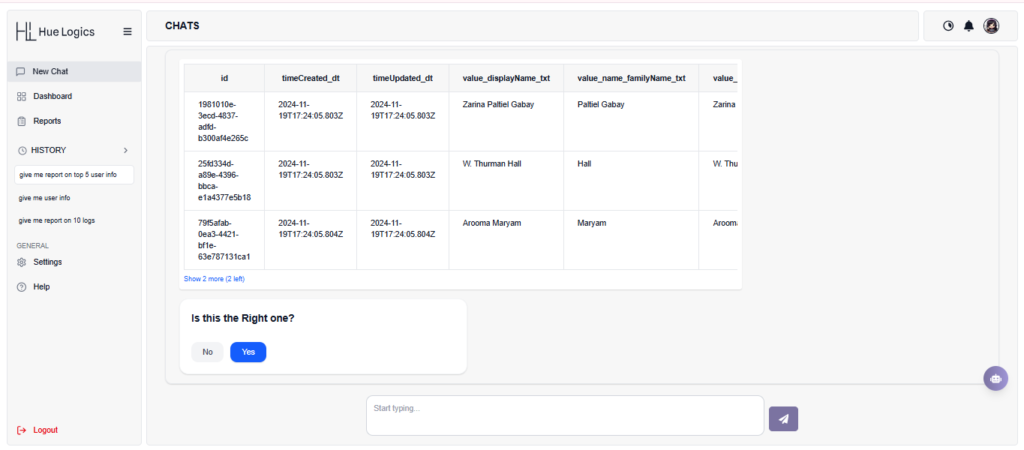
Users can generate reports directly from the New Chat screen using simple queries.
Steps: #
- Enter a query such as:
- “Give me a report on user info.”
- “Give me a report on the top 10 logs.”
- The system displays the data in a table format (preview)
Confirmation: #
- Below the table, a confirmation message appears:
“Is this the right one?” - Click:
- Yes → Report generation starts
- No → Modify the query
Result: #
- After clicking Yes, a success message is shown
- The report starts generating in the background
Step 2: Reports Page #
The Reports page displays all generated reports.
Features: #
- List of all reports with:
- Query name
- Total records
- Progress status
- Created date
Actions: #
- Download Report – Click the download icon to export the report in Excel format
- Delete Report – Remove unwanted reports
- View report – User can view the report before downloading.
Status Indicators: #
- Completed – Report is ready to download
- Failed – Report generation was unsuccessful
- Progress Bar – Shows report generation status